


Jailbreaking your iPhone might sound like stepping into uncharted territory, but trust me, it’s not as scary as it seems. In fact, it can open up a whole new world of customization and features that Apple doesn’t want you to see. In this guide, I’ll walk you through how to jailbreak from iPhone step-by-step and share some tips, tricks, and my personal experience along the way. Let’s dive in!
What Is Jailbreaking an iPhone? 🤔
Jailbreaking an iPhone is the process of removing software restrictions imposed by Apple. Think of it like unlocking the door to your favorite room, but instead of just walking in, you discover hidden treasure. By jailbreaking, you can install third-party apps, tweak system settings, and do things Apple normally wouldn’t let you.
Is Jailbreaking Safe? My Honest Opinion
Short answer: Yes and no.
Long answer? Let me explain. Jailbreaking is technically safe if you follow the steps correctly and use trusted tools. However, it does come with risks:
- Security concerns: You’re bypassing Apple’s protections, so tread carefully.
- Warranty issues: Apple won’t fix your phone if it’s jailbroken.
- Performance problems: Some tweaks might slow your phone down.
Personally, I’ve jailbroken my iPhone a couple of times. It was an exhilarating experience—like breaking the rules in the most harmless way possible. But I’ve also learned to weigh the risks. Do your homework before you leap.
Benefits of Jailbreaking an iPhone 🚀
Why bother jailbreaking? Here’s what you stand to gain:
- Access to exclusive apps: Install apps not available on the App Store.
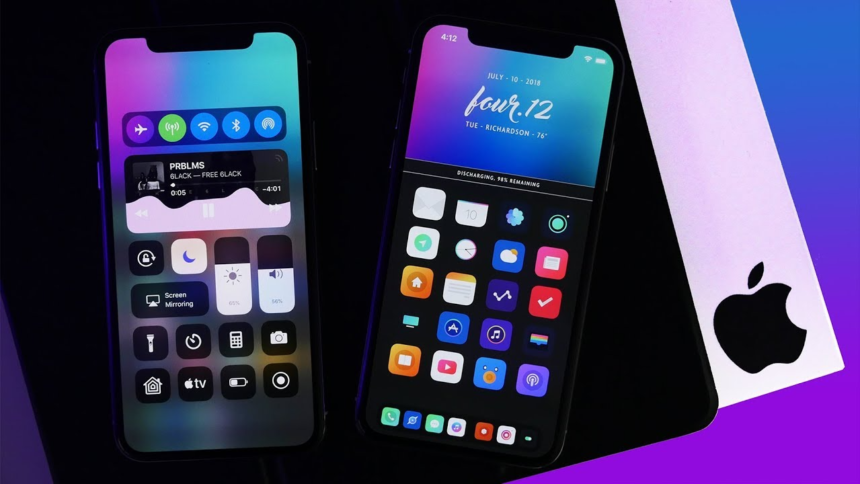
- Customization: Change your home screen, icons, and even fonts.
- Advanced features: Enable call recording, file management, and more.
- Bypass restrictions: Use your iPhone the way you want, not how Apple dictates.
What You Need Before Jailbreaking
Before we jump into how to jailbreak from iPhone, here’s what you need:
More Read

- A backup: Use iCloud or iTunes to back up your data. Trust me; you don’t want to lose your photos or messages.
- A compatible iPhone and iOS version: Not all tools work on all devices.
- A computer (optional): Some jailbreak tools require a PC or Mac.
- Patience: It’s not rocket science, but it’s not instant coffee either.
Step-by-Step Guide on How to Jailbreak iPhone
Alright, let’s get to the fun part—how to jailbreak from iPhone. Follow these steps carefully:
- Check compatibility: Find out if your iPhone and iOS version can be jailbroken.
- Download a trusted jailbreak tool: Popular ones include Checkra1n, Unc0ver, and Taurine.
- Install the tool on your computer (if needed): Some tools like Checkra1n require a Mac or PC.
- Connect your iPhone: Plug your iPhone into the computer.
- Run the jailbreak tool: Follow the on-screen instructions.
- Wait for the process to complete: Your iPhone will reboot, and voilà—it’s jailbroken!
Top Tools to Jailbreak iPhone 🔧
- Checkra1n: Best for older iPhones.
- Unc0ver: Works on a wide range of iOS versions.
- Taurine: Great for stability and performance.
Each tool has its pros and cons, so pick the one that suits your device.
Common Mistakes to Avoid
- Skipping the backup: Always back up your data before jailbreaking.
- Using shady tools: Stick to reputable websites to download jailbreak software.
- Ignoring updates: Jailbreaking often disables automatic updates, so keep track of new versions manually.
What Happens After You Jailbreak an iPhone? 🌟
Once you’ve completed the process, your iPhone transforms into a powerhouse. Here’s what you can do:
- Install Cydia or Sileo, which are app stores for jailbroken devices.
- Download tweaks to customize everything—from your lock screen to your battery icon.
- Access powerful tools like file managers and emulators.
FAQs About Jailbreaking
1. Is jailbreaking legal?
Yes, in most countries. But it might void your warranty.
2. Can I undo a jailbreak?
Absolutely. You can restore your iPhone using iTunes to remove the jailbreak.
3. Does jailbreaking slow down my phone?
Not usually, but some tweaks can hog resources. Choose wisely.
My Final Thoughts on Jailbreaking 🛠️
Jailbreaking is like adding spice to your favorite dish. It’s not for everyone, but if you love tinkering and making your phone truly yours, it’s worth a shot. Just remember to proceed with caution and enjoy the process.
Have questions or want to share your jailbreaking journey? Drop a comment below! And if this guide helped you, share it with your friends who are curious about how to jailbreak from iPhone. Let’s spread the knowledge! 😊