



Facebook Messenger displays a notification for each new message, and when participating in group chats with a lot of active members, you can expect to receive a lot of them. The Mute feature allows you put a stop to the flood of notifications on Facebook Messenger.
How To Mute a Conversation in Messenger
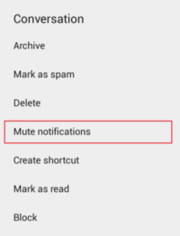
Open the Facebook Messenger app, hold your finger down on the desired conversation, and select Mute notifications:
How To Mute a Group Chat in Messenger
Go to the Group tab, and tap the More menu (3 vertical dots) displayed at the top-right corner of the desired group. Select Mute Notifications:
More Read


You can choose to mute notifications for the selected conversation or group for a specific time period (15 minutes, 1 hour, 8 hours, etc.) or until you manually unmute it. Furthermore, if you have an alarm configured on your smartphone, you can choose to mute notifications until the alarm goes off:
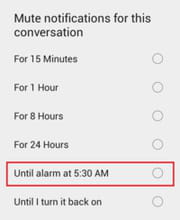
N.B. You can set up an alarm by going to Settings > Clock > Alarm.