This guide will explain how to customize your default swipe gestures in the Gmail app. Users can use these options to either archive or delete emails with ease.
Customize Swipe Gestures in the Gmail App
By default, the Gmail app allows you to rapidly archive or delete messages by swiping your finger left or right over an email.
The left-swipe Archive option removes a message from your inbox, moving it to your inbox’s All Mail tab:
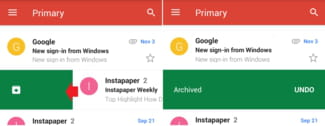
The right-swipe Delete option permanently deletes a selected message, moving it to the Trash folder:

To customize these options, open the Gmail app and tap Menu > Settings > General settings > Gmail default action. Here, you can choose to reset your default swipe gestures for Archive and Delete: