


How to Automatically Launch TeamViewer at Windows Startup?

Praveen Kumar Ganesan
Praveen Kumar Ganesan also called as GPKUMAR is the visionary Founder of Inavit Studio and Inavitnews, where technology meets storytelling. With a passion for innovation and...
1 Min Read

TeamViewer is a software that facilitates collaboration via desktop sharing, online meetings, file transfers, and more.

If you find that you use this software very frequently, you can add it to your list of Windows startup programs so that it automatically launches when you power on your computer.

Automatically Start TeamViewer at Windows Launch

In the TeamViewer interface, click Extras > Options:

Go to the General section, and check Start TeamViewer with Windows.

A new dialog will open up prompting you to enter a password and confirm:
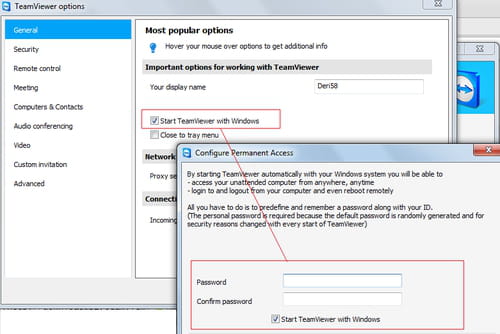
This password will allow you to access your computer remotely and perform several operations from almost anywhere.


Share This Article
Praveen Kumar Ganesan also called as GPKUMAR is the visionary Founder of Inavit Studio and Inavitnews, where technology meets storytelling. With a passion for innovation and digital transformation, Praveen blends creativity with strategic thinking to craft compelling tech, gaming, and news content that resonates with a global audience.
0 0 votes
Article Rating
Subscribe
Notify of
guest
0 Comments
Oldest
Newest Most Voted
0
Would love your thoughts, please comment.x
()
x


