



When you first install Windows 8 / 10, you need to link it to an e-mail address and implicitly created a Microsoft account. By default your password, will be the one used for your Microsoft account. How to change it?
Method 1:
- Press Windows + X > Control Panel.
- Click on Accounts and Family Safety.
- Click on User Accounts.
- Choose Make change to my account in PC settings.
Method 2:
- From the Start screen. press Windows + C to display the Charm Bar.
- Click on Settings > Change PC settings > Accounts
- Go to the Sign-in options and under A strong password makes your PC more secure, click on Change.
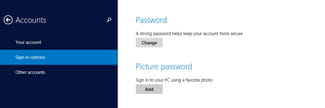
- A new menu will be displayed:
- Enter your current password and then your new password.
- Confirm and click on Next.





