


How to Disable/Enable the Touchpad?

Praveen Kumar Ganesan
Praveen Kumar Ganesan also called as GPKUMAR is the visionary Founder of Inavit Studio and Inavitnews, where technology meets storytelling. With a passion for innovation and...
1 Min Read

The Touchpad can sometimes be accidentally disabled on your laptop, or you may disable it because it’s overly responsive.

If you would like to switch it back on or shut it off, this tutorial will walk you through the necessary steps.

Turn On/Off the Touchpad on a Laptop

To reactivate your touchpad, first try restarting your PC.

If that doesn’t help, go to Control Panel > Mouse > Settings > Enable (or Disable to disable):
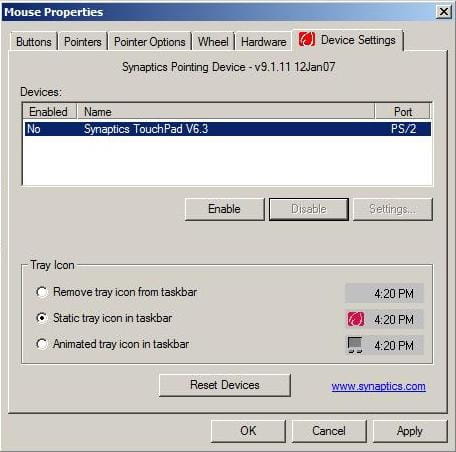
N.B. On some models, there is a keyboard shortcut to activate or deactivate the touchpad. For example, on an ACER machine, press FN + F7. Some newer laptops include a dedicated button to perform this manoeuvre.

Share This Article
Praveen Kumar Ganesan also called as GPKUMAR is the visionary Founder of Inavit Studio and Inavitnews, where technology meets storytelling. With a passion for innovation and digital transformation, Praveen blends creativity with strategic thinking to craft compelling tech, gaming, and news content that resonates with a global audience.
0 0 votes
Article Rating
Subscribe
Notify of
guest
0 Comments
Oldest
Newest Most Voted
0
Would love your thoughts, please comment.x
()
x



