


How To Close All Tabs in Google Chrome for Android?

Praveen Kumar Ganesan
Praveen Kumar Ganesan also called as GPKUMAR is the visionary Founder of Inavit Studio and Inavitnews, where technology meets storytelling. With a passion for innovation and...
1 Min Read

Like Google Chrome for desktop, Google Chrome for Android allows you to use tabs during your browsing sessions. This lets you easily access and keep track of several webpages at once.

If you find yourself with too many tabs open and are looking for a way to close them all, rather than individually, this FAQ will answer any questions that you may have.

Close All Tabs in Google Chrome for Android

Launch Google Chrome on your Android device. Next to the search bar, you will see a button with a number corresponding to the amount of tabs that you have open. Tap this button:

Tap the menu button > Close all tabs:
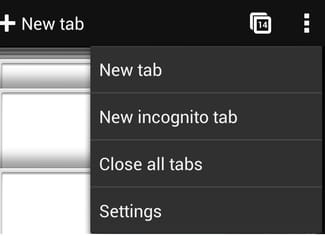
All of your tabs should now be closed.

Share This Article
Praveen Kumar Ganesan also called as GPKUMAR is the visionary Founder of Inavit Studio and Inavitnews, where technology meets storytelling. With a passion for innovation and digital transformation, Praveen blends creativity with strategic thinking to craft compelling tech, gaming, and news content that resonates with a global audience.
0 0 votes
Article Rating
Subscribe
Notify of
guest
0 Comments
Oldest
Newest Most Voted
0
Would love your thoughts, please comment.x
()
x



