


How To Set Swipe Gestures in the Gmail App?

Praveen Kumar Ganesan
Praveen Kumar Ganesan also called as GPKUMAR is the visionary Founder of Inavit Studio and Inavitnews, where technology meets storytelling. With a passion for innovation and...
1 Min Read

This guide will explain how to customize your default swipe gestures in the Gmail app. Users can use these options to either archive or delete emails with ease.

Customize Swipe Gestures in the Gmail App

By default, the Gmail app allows you to rapidly archive or delete messages by swiping your finger left or right over an email.
The left-swipe Archive option removes a message from your inbox, moving it to your inbox’s All Mail tab:
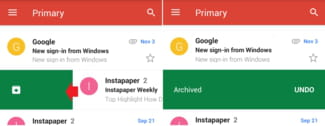
The right-swipe Delete option permanently deletes a selected message, moving it to the Trash folder:

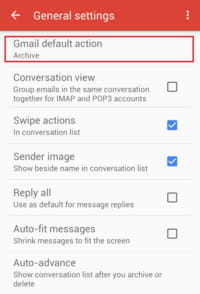
To customize these options, open the Gmail app and tap Menu > Settings > General settings > Gmail default action. Here, you can choose to reset your default swipe gestures for Archive and Delete:
Share This Article
Praveen Kumar Ganesan also called as GPKUMAR is the visionary Founder of Inavit Studio and Inavitnews, where technology meets storytelling. With a passion for innovation and digital transformation, Praveen blends creativity with strategic thinking to craft compelling tech, gaming, and news content that resonates with a global audience.
0 0 votes
Article Rating
Subscribe
Notify of
guest
0 Comments
Oldest
Newest Most Voted
0
Would love your thoughts, please comment.x
()
x




