
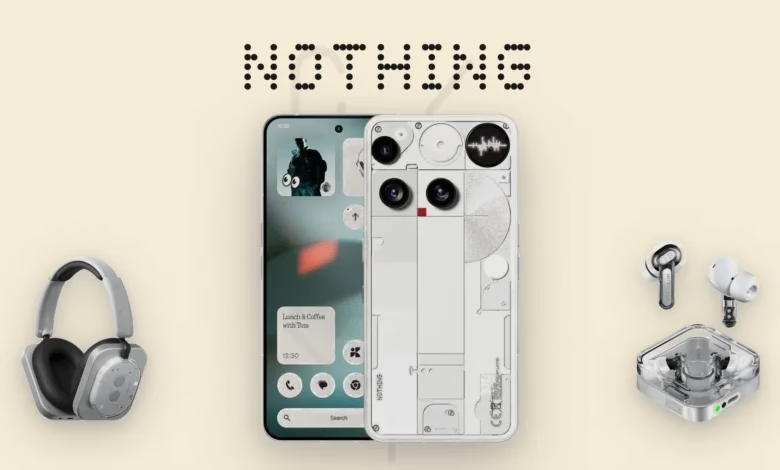


Nothing has officially started rolling out Nothing OS 5.0, its latest major smartphone software update based on Android 17. The update introduces a refreshed user interface, new lock screen designs, smarter widgets, improved AI-powered tools and several performance enhancements.
The new software is designed to make Nothing smartphones more personal, responsive and useful. It also brings Android 17 features, including separate Notification and Quick Settings panels, improved privacy controls and cross-platform Quick Share support.
The stable rollout began on October 12, 2026, with the Nothing Phone (3), followed by additional eligible Nothing and CMF devices. However, the update will reach different smartphone models in phases.
Here is everything you need to know about Nothing OS 5.0, including its new features, supported smartphones and release schedule.
What Is Nothing OS 5.0?
Nothing OS 5.0 is the latest major version of Nothing’s custom Android operating system. It is built on Android 17 and focuses on three major areas: personalisation, artificial intelligence and system performance.
Unlike a minor software update, Nothing OS 5.0 brings changes throughout the smartphone experience. These include redesigned home screen elements, new clock faces, improved widgets, updated system animations and additional AI capabilities.


Nothing has also introduced a dedicated Glyph app, making it easier to manage the lighting and notification features available on compatible Nothing smartphones.
Nothing OS 5.0: Top New Features
1. Redesigned Home Screen and Interface
Nothing OS 5.0 introduces a refreshed interface with a cleaner appearance and improved personalisation options.


The new design includes:
- Wallpaper-based adaptive colours.
- Tinted application icons.
- Transparent widgets and interface elements.
- Updated system icons and layouts.
- The new Geist system typeface.
- Smoother animations throughout the interface.
The adaptive colour system automatically adjusts compatible interface elements based on the colours of the selected wallpaper.
2. New Lock Screen Clock Faces
Nothing has introduced two new clock styles to improve lock screen personalisation.
Gooey: Offers a playful appearance with bold, fluid shapes.


Micrographics: Uses a minimalist, hardware-inspired design to display information such as the time, date, weather and upcoming meetings.
Users also get additional colour options to customise the clock appearance.
3. New Collector and Away Time Widgets
Nothing OS 5.0 introduces two interesting widgets designed to make the home screen more useful.
Collector Widget
The Collector widget allows users to turn favourite photos into stickers and create visual collections of people, places and objects. These collections can be displayed on the home screen.
Away Time Widget
Away Time tracks how long users stay away from their smartphones. It provides information about their longest breaks and screen-free habits throughout the week.
These additions give users more ways to personalise their phones while also encouraging more intentional smartphone usage.
4. Dedicated Glyph App and Glyph Timer
Nothing’s signature Glyph Interface receives additional controls in Nothing OS 5.0.
A dedicated Glyph app brings compatible Glyph settings together in one place. Users can manage their lighting features, sounds, ringtones and schedules more conveniently.
The new Glyph Timer also allows users to start countdowns directly from the home screen. The remaining time can then be displayed through the phone’s Glyph Interface.
This makes the Glyph lighting system more practical for everyday activities.
5. Improved Essential AI Features
Artificial intelligence is another important part of Nothing OS 5.0.
The company has improved its Essential AI tools to help users capture information, organise notes and create simple applications.
Essential Space Smart Collections
Essential Space can automatically group related captured information into collections. Improved search and a redesigned capture experience also make saved content easier to find.
The platform is also adding Model Context Protocol (MCP) support, allowing compatible AI tools to access selected Essential Space information with user permission.
Essential Voice
Essential Voice receives improvements to voice transcription and formatting.
New capabilities include:
- Real-time text transcription while speaking.
- Better formatting for notes and summaries.
- Improved organisation of spoken information.
- Support for transcription in more than 100 languages.
- Audio capture through the Super Mic feature on compatible Ear (3) hardware.
Essential Apps Builder
One of the more interesting additions is Essential Apps Builder.
Users can describe a simple application in natural language, and the tool can help build a custom app without requiring traditional programming skills.
Created applications can be launched directly from the smartphone’s home screen.
Access is still in an early beta stage and is being introduced gradually.
6. Better Performance and Multitasking
Nothing says OS 5.0 improves everyday smartphone performance through system-level optimisations.
The improvements include:
- Faster application launches.
- Better touch responsiveness.
- Smoother scrolling.
- Improved background application management.
- Better memory management.
- Refined system animations.
These changes are designed to reduce unnecessary application reloads and improve the overall experience when switching between multiple applications.
7. Improved Bluetooth Controls
Bluetooth controls have also received a redesign.
Users can find nearby Bluetooth devices and connect or disconnect them directly through the redesigned Quick Settings interface.
The aim is to reduce the number of steps needed to manage connected devices.
8. Android 17 Features
Since Nothing OS 5.0 is based on Android 17, compatible smartphones also receive several platform-level improvements.
Important additions include:
Separate Notifications and Quick Settings
Users can access notifications and Quick Settings through separate panels instead of managing everything from one combined interface.
Cross-Platform Quick Share
Quick Share makes it easier to share files with nearby Android devices. It also supports sharing with iPhones through a QR-code-based secure web link.
Improved Privacy Controls
Updated privacy indicators and permission controls make it easier to understand when applications access the camera, microphone and location.
Other Android 17 improvements include:
- Enhanced screen recording controls.
- Expanded Dark Theme support.
- Noto 3D emoji.
- Redesigned Recent Apps screen.
- Independent Assistant volume control.
- Improved HDR viewing.
Nothing OS 5.0 Eligible Phones
Not every Nothing smartphone will receive the new software update.
According to Nothing’s official rollout information, the following devices are included in the Nothing OS 5.0 upgrade schedule.
| Smartphone | General release timeline |
|---|---|
| Nothing Phone (3) | From October 12, 2026 |
| Nothing Phone (4a) Pro | Early November 2026 |
| Nothing Phone (4a) | Early November 2026 |
| Nothing Phone (3a) Pro | Early November 2026 |
| Nothing Phone (3a) | Early November 2026 |
| Nothing Phone (2a) | Mid-November 2026 |
| Nothing Phone (2a) Plus | Mid-November 2026 |
| Nothing Phone (3a) Lite | Late December 2026 |
| Nothing Phone (4b) | Mid-January 2027 |
| CMF Phone 2 Pro | Mid-January 2027 |
Important: These are indicative rollout timelines, not guaranteed delivery dates. Availability can vary depending on region and carrier.
Which Nothing Phones Will Not Receive Nothing OS 5.0?
Nothing has confirmed that the following devices have reached the end of major software support and will not receive Nothing OS 5.0:
- Nothing Phone (1)
- Nothing Phone (2)
- CMF Phone 1
Owners of these smartphones should not expect the Nothing OS 5.0 major upgrade.
How to Download Nothing OS 5.0
If your smartphone is eligible and the update is available in your region, follow these steps:
- Open Settings on your Nothing smartphone.
- Navigate to System.
- Select System Update.
- Tap Check for Updates.
- If Nothing OS 5.0 is available, download the update.
- Install the software and restart your device if required.
The update is being distributed in phases. Therefore, some users may receive it earlier than others, even when they own the same smartphone model.
Before installing a major software update, back up important photos, contacts and other personal information. Make sure your phone has sufficient battery and storage.
When Will Nothing OS 5.0 Be Available in India?
Nothing OS 5.0 is being distributed through a phased rollout rather than becoming available to every eligible smartphone simultaneously.
The Nothing Phone (3) began receiving the stable release on October 12, 2026. Other eligible models are scheduled to receive the update from November onwards.
Indian users can check their availability through Settings > System > System Update.
The exact arrival date can vary depending on the device model and regional rollout schedule.
Frequently Asked Questions
Is Nothing OS 5.0 based on Android 17?
Yes. Nothing OS 5.0 is built on Android 17 and includes additional Nothing-specific interface, personalisation, Glyph and AI features.
Has Nothing OS 5.0 been released?
Yes. Nothing started the stable general release on October 12, 2026, initially covering the Phone (3) and subsequently expanding to other eligible devices.
Will Nothing Phone (2) receive Nothing OS 5.0?
No. Nothing has confirmed that Phone (2) has reached the end of major software support and is not eligible for Nothing OS 5.0.
Will Nothing Phone (2a) get Nothing OS 5.0?
Yes. Nothing Phone (2a) is included in the official rollout schedule, with general release planned for mid-November 2026.
What are the biggest features of Nothing OS 5.0?
The major additions include a redesigned interface, new lock screen clocks, Collector and Away Time widgets, improved Essential AI tools, a dedicated Glyph app, better performance and Android 17 features.
How can I check whether Nothing OS 5.0 is available?
Go to Settings > System > System Update on your eligible Nothing smartphone and check for available updates.
Final Thoughts
Nothing OS 5.0 is a substantial upgrade for compatible Nothing smartphones. Instead of focusing only on visual changes, the company has combined interface improvements with useful widgets, expanded AI tools and Android 17 capabilities.
The improved Essential Space experience, Essential Apps Builder and dedicated Glyph controls are among the most interesting additions.
However, owners of older devices such as the Nothing Phone (1), Phone (2) and CMF Phone 1 will miss out on this major software upgrade.
If you own an eligible Nothing smartphone, check the system update section regularly to see when Nothing OS 5.0 becomes available for your device.
Information in this article is based on Nothing’s official rollout information available as of November 2, 2026. Rollout dates may change.