



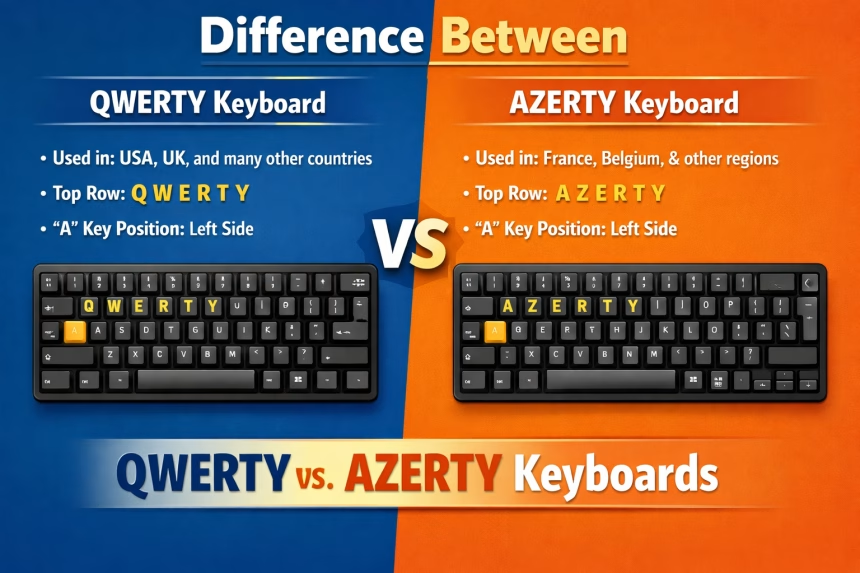
The keyboard is an integral part of a computer, and it comes with many varied layouts. Of the many types of keyboards, the QWERTY and the AZERTY keyboards are the most widely used.
This tutorial will introduce you to these two types of keyboards and then show you how to change from one to another.
What is a QWERTY Keyboard?
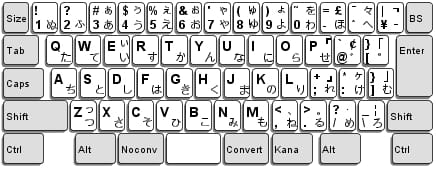
QWERTY keyboards, also known as Sholes keyboards, refer to the five consecutive letters on the upper left corner of the keypad. This type of keyboard bears the layout used for Latin languages and is the most common keyboard used in the United States:
What is an AZERTY Keyboard?
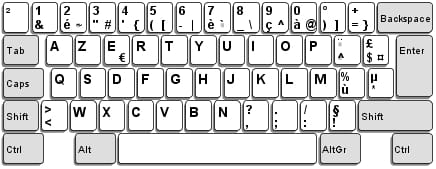
An AZERTY keyboard is the most common type of keyboard used in France. The letters are also found in a consecutive sequence on the upper left corner of the keypad:

How To Change Your Keyboard Language
Go to the Start menu, and open Control Panel.
Choose Clock, Language and Region, and select Regional and Language Options. In the Installed Services section, click Add.
If your keyboard language is set to French (AZERTY), change it to English US/UK, and if your keyboard is set to English (QWERTY), change the language to French (AZERTY).
In the Keyboard section, choose QWERTY or AZERTY, and click OK.

Once you apply the changes, your keyboard language should be changed.
How To Unblock Your Keyboard from AZERTY Mode
If you would like to revert your keyboard from AZERTY mode to QWERTY mode, click the Start menu > Settings > Time, Language, and Region.
Click Modify keyboards or other input methods. Select the keyboard that you wish to delete, then click Delete > OK.
FAQ: Difference Between QWERTY vs. AZERTY Keyboards
QWERTY and AZERTY differ mainly in letter placement. QWERTY is used in English-speaking countries, while AZERTY is common in French-speaking regions and includes symbols and accents needed for French typing.
Most users type faster on the layout they learned first, but QWERTY is generally optimized for speed and comfort, while AZERTY prioritizes French language characters.
AZERTY is used because it places accented letters and French-specific characters in more accessible positions, making everyday typing easier for French speakers.
Yes. You can change your keyboard layout in system settings instantly. However, it may take time to build new muscle memory.
Most programmers prefer QWERTY because special characters like brackets and slashes are easier to reach. AZERTY can work, but coding often feels slower due to symbol placement.
Absolutely. Any modern device lets you switch layouts digitally, even if the physical keys display a different layout.
QWERTY is the global standard and is used in most countries. AZERTY is primarily used in France, Belgium, and parts of North Africa.
If you type frequently in French, AZERTY can help with faster access to accents. For general use or multilingual typing, QWERTY remains more versatile.
Mobile keyboards default to QWERTY in most regions, but they automatically switch to AZERTY if your language or region is set to French.
Neither is universally “better.” QWERTY excels for speed, productivity, and coding, while AZERTY is ideal for French-language accuracy and ease of use.
