


Copy Music from CD to Hard Disk with Windows Media Player

Praveen Kumar Ganesan
Praveen Kumar Ganesan also called as GPKUMAR is the visionary Founder of Inavit Studio and Inavitnews, where technology meets storytelling. With a passion for innovation and...
1 Min Read

Windows Media Player allows you to copy music from a CD to your hard disk.

N.B. By default, audio files are stored in the Music Library. If you want to change the default folder, check out this tip.

Copy Music from a CD to a Computer

To copy music from a CD onto your computer, begin by opening Windows Media Player. Next, insert the CD that you want to copy.
Click Rip > More options.

N.B. The default rip format is WMA. If you want to change it to MP3, then click Format > MP3 in Rip Settings:
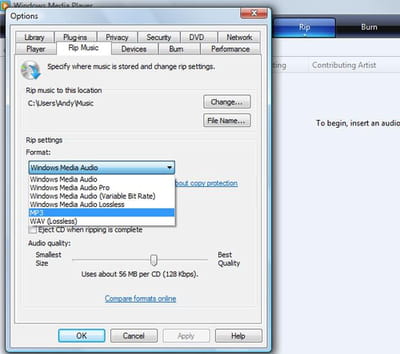
Uncheck any songs that you do not want to copy, and click Copy from CD.

In the window that opens, select one of the options and check the box, thus accepting the Terms of Use.

Once the ripping process is over, you should be able to find the songs that were on your CD on your computer:

Share This Article
Praveen Kumar Ganesan also called as GPKUMAR is the visionary Founder of Inavit Studio and Inavitnews, where technology meets storytelling. With a passion for innovation and digital transformation, Praveen blends creativity with strategic thinking to craft compelling tech, gaming, and news content that resonates with a global audience.
0 0 votes
Article Rating
Subscribe
Notify of
guest
0 Comments
Oldest
Newest Most Voted
0
Would love your thoughts, please comment.x
()
x